As a CNC router supplier, one of the most common questions I get from new buyers is some version of this: “What’s the maximum thickness I can cut on your machines?” It’s such a reasonable question—if you’re investing in equipment to cut large panels, thick slabs, or heavy stock, you don’t want to waste time or money on a machine that will leave you straining to cut through a 2-inch MDF board or giving up entirely on a 4-inch solid walnut slab. The answer, though, isn’t a simple number. I’ve seen too many buyers assume a “max thickness” is one fixed value, only to be frustrated when their machine can’t hit that mark in real-world projects. Let me break down what actually determines your CNC router’s maximum cutting thickness, how to calculate it for your specific needs, and what to look for when shopping for a machine that works for you. CNC Router
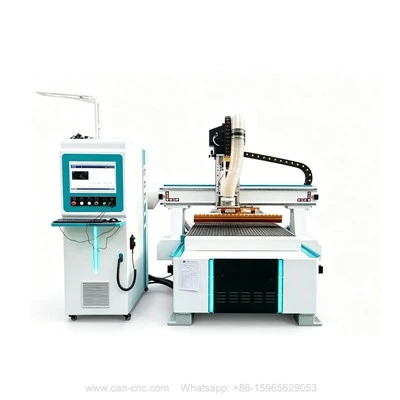
First, let’s get one thing straight: maximum cutting thickness isn’t a random spec manufacturers pull out of thin air. It’s a combination of four core factors, and every single one of them interacts to change what you can actually cut. The first, and most obvious, is the spindle’s power and torque. Think of the spindle as the CNC router’s “muscle.” A low-power spindle (like a 1.5kW spindle, common on small hobbyist routers) doesn’t have enough force to push a bit through dense, thick material. If you try to cut a 3-inch solid oak slab with a 1.5kW spindle, the bit will bind, the router will stall, you’ll burn through your material, and worst case, you could break the bit or even damage the machine’s spindle. Higher-power spindles—3kW, 5kW, or even 7.5kW industrial spindles—generate enough torque to cut through much denser material. For example, a 5kW spindle can handle up to 6-inch softwood, 4-inch plywood, or 2-inch solid hardwood, depending on the bit and feed rate. But torque isn’t just about raw power; it’s about how that power is delivered. Spindles with variable speed control are even more important here. Hard material needs slower speeds and more torque, while soft material can handle higher speeds. If your spindle only runs at one fixed speed, you’ll struggle to cut anything thicker than an inch without issues.
Next up is the gantry and work envelope of your CNC router. The gantry is the frame that holds the spindle and moves it along the X and Y axes, and the work envelope is the total size of the bed where you clamp your material. Wait—how does that relate to thickness? Let’s say you have a 4×8 ft CNC router with a gantry that sits 8 inches above the bed. That means, theoretically, the maximum thickness of material you can cut is 8 inches, right? Not exactly. Because you have to leave space for the bit to plunge through the material and for the collet that holds the bit. A 1/2-inch collet takes up about an inch of space, and a 6-inch bit needs at least a couple inches of clearance above the material so the router can plunge deep enough. So that 8-inch gantry clearance effectively drops to about 5 or 6 inches of usable material thickness. But here’s the catch: if you need to cut material thicker than that, you don’t have to buy a huge gantry. Some buyers I work with have special projects that require cutting 10-inch thick polystyrene for sign bases, for example. We work with them to use a longer bit, and if their gantry has the clearance for it, we adjust their workholding to lift the material just enough to fit the longer bit. That way, they don’t have to invest in a whole new large-gantry machine just for a one-off project. But if you regularly work with material 6 inches or thicker, you’ll want a gantry with at least 10 inches of clearance to give yourself that breathing room.
The third big factor is the type of material you’re cutting. This is where I see the biggest misconceptions. A lot of new buyers ask for a max thickness for “wood,” but not all wood is the same. Softwoods like pine, cedar, or poplar are much less dense than hardwoods like walnut, oak, or maple. You can cut a 6-inch thick pine slab with a 5kW spindle and a downcut bit, but that same spindle will barely get through 3 inches of solid walnut because walnut is 2-3 times denser. And it’s not just wood—other materials have their own density and hardness. Acrylic is dense, but it’s also brittle; you can cut 4-inch thick acrylic, but you have to use a special upcut bit to avoid chipping the edges. Foam is super light, so you can cut 12-inch thick foam with a low-power spindle as long as you use a long, straight flute bit to clear the foam chips. Even metals matter: aluminum is soft, but cutting thick aluminum requires a different approach than steel. A 5kW router can cut 1-inch thick aluminum, but cutting 2-inch thick aluminum would need a 7.5kW spindle and a slower feed rate to avoid overheating the bit. Then there’s composites like MDF, plywood, or carbon fiber—MDF is dense and uniform, so you can cut thicker MDF than solid hardwood, while carbon fiber is abrasive and will wear out bits fast, so you have to go slower, which limits how thick you can cut without burning.
The fourth, and often overlooked, factor is your cutting parameters: bit size, feed rate, and plunge rate. A lot of buyers will come to me and say, “Your spec says max 6 inches, but I can only cut 4 inches thick.” Nine times out of ten, that’s not the machine’s fault—it’s how they’re running the job. First, bit size: a 1/8-inch diameter bit can only handle so much force before it breaks, so you’ll never cut 6 inches with a 1/8-inch bit, no matter how powerful your spindle is. You need a larger diameter bit—1/2 inch or 3/4 inch—for thick material because it has more surface area to distribute the force, so it won’t break or bend. Then there’s feed rate, which is how fast the spindle moves along the material. If you’re going too fast, the bit can’t remove chips fast enough, leading to binding and overheating, which limits how deep you can cut. Plunge rate is even more important when cutting thick material. Plunging straight down into a 4-inch slab at the same speed you move along a panel is a surefire way to break a bit. You have to plunge slowly, making multiple shallow passes (called peck plunging) instead of one deep plunge. That’s a setting most modern CNC routers can be programmed for, but if you’re running a hobbyist machine with limited control, you’ll hit a thickness ceiling fast. And don’t forget about the number of flutes on your bit. More flutes mean better chip clearance for thick material, which means you can cut deeper without issues.
Wait a second—so does that mean there’s no such thing as a real maximum cutting thickness? Sort of, but there is a practical maximum, the thickness you can cut regularly without sacrificing quality or speed. Let me give you an example from a recent client I worked with. They were a custom furniture maker who wanted to cut thick solid walnut slabs for table tops, about 2.5 inches thick. They had a 3kW spindle router with 7 inches of gantry clearance. I told them they’d be fine, but they were skeptical because another supplier told them their machine could only cut 1.5 inches thick. The difference? The other supplier was quoting theoretical max thickness for a 1/8-inch bit running at max speed. My client was using a 1/2-inch, 2-flute downcut bit, with a feed rate of 80 inches per minute and a peck plunge rate of 10 inches per minute. They were cutting through 2.5-inch walnut cleanly, no burning, no broken bits, and in a fraction of the time they’d spent cutting that thickness with their old handheld router. That’s the difference between a theoretical spec and what works in real projects.
Another example: a sign company client needed to cut 10-inch thick polystyrene for large exterior signage. Their machine was a 5kW router with a 10-inch gantry clearance. The theoretical max for their machine was around 7 inches, but we adjusted their workholding to lift the material 3 inches off the bed, used a 1/2-inch straight flute bit that was 12 inches long, and adjusted their feed rate to 120 inches per minute (since foam is soft). They were cutting through 10-inch foam like it was butter, something no one had told them was possible because they were using the wrong bit and wrong workholding at first. So the spec isn’t set in stone—it’s a baseline you can build around with the right accessories and programming.
Now, what about the difference between cutting through, pocketing, and profiling? A lot of buyers mix these up too. If you’re cutting through a 2-inch board, that’s one pass (or two shallow passes) all the way through. If you’re pocketing a 2-inch recess into a board, you can do that layer by layer, taking 1/8-inch deep passes each time, which means you can effectively work with material much thicker than your gantry clearance. Profiling, or cutting the outline of a part, is similar to cutting through, because you have to go all the way through the material. So if your project is mostly cutting pockets, you can go thicker than if you’re cutting through parts regularly. That’s an important distinction to make when choosing your machine.
So how do you figure out what maximum cutting thickness you actually need, instead of just going for the highest number you see? Start by listing all the materials you’ll be cutting most often, and their thicknesses. If you’re a hobbyist cutting 1/4-inch MDF for signs, max thickness is irrelevant—any entry-level router will work. If you’re a cabinet maker cutting 3/4-inch plywood and 1-inch solid wood for doors, you can get away with a 3kW spindle and 5 inches of gantry clearance. If you’re a boat builder cutting 4-inch thick marine-grade plywood or solid fiberglass, you’ll need a 5kW or 7.5kW spindle and at least 8 inches of gantry clearance. If you’re doing large-scale sculpting or architectural woodwork that requires cutting 8-12 inch thick solid wood or foam, you’ll want a heavy-duty industrial router with a 12-inch or higher gantry clearance.
And don’t forget about maintenance and wear. Cutting thick material puts more stress on your spindle, bits, and machine components. If you’re regularly cutting 6-inch thick hardwood, you’ll need to replace bits more often, and you’ll want to do regular spindle alignment and lubrication to keep your machine running smoothly. Cheap bits will break when cutting thick material, so invest in high-quality carbide bits made for thick stock—they cost more upfront, but you’ll save money on broken bits and wasted material.
I’ve been working with CNC routers for over 10 years now, and one of the biggest mistakes I see buyers make is chasing a high maximum thickness spec without considering their actual workflow. I once had a buyer who bought a $20,000 industrial CNC router advertised with a 12-inch max cutting thickness. He got it home, tried to cut 10-inch solid oak, and couldn’t do it without burning the edges and breaking bits every other part. It turned out he was using a 1/4-inch bit, running at max feed rate, and his machine’s spindle, while powerful, didn’t have enough rigidity for that kind of thick, dense material. After we adjusted his bit size, feed rate, and peck plunging settings, he was able to cut 10-inch oak, but he later told me he only ever cuts up to 4-inch thick material for his furniture line anyway—so he wasted $10,000 extra on specs he’d never use. That’s why it’s so important to talk to someone who actually understands CNC routers, not just a sales rep pushing the highest numbers.

At the end of the day, the maximum cutting thickness for a CNC router isn’t a single number. It’s a formula that accounts for your spindle power, gantry clearance, workholding, bit choice, and the material you’re working with. The best way to avoid wasting money or getting a machine that doesn’t work for you is to be honest about your needs. If you’re not sure what you need, reach out—we work with every kind of customer, from hobbyists to large manufacturers, to match them with a CNC router that fits their actual projects, not just a spec sheet. We can help you calculate what real-world cutting thickness you’ll be able to achieve, recommend the right bits and workholding, and even run test cuts with your specific material to show you exactly what your machine can do. Don’t settle for a machine based on a generic max thickness spec—get a solution that works for your business. If you’re ready to start planning your next project, or you want to learn more about how to get the most out of your CNC router’s capabilities, reach out to our team to discuss your needs and find the perfect fit for your workflow.
Welding Robot References
- Woodworking Machinery Manufacturers Association. (2022). CNC Router Performance Specifications: A Guide for Buyers.
- Industrial Spindle Technology Journal. (2021). Torque and Cutting Thickness Correlations for CNC Machining.
- National Association of Sign and Graphic Manufacturers. (2023). CNC Material Thickness Guidelines for Common Sign Substrates.
- American Wood Council. (2020). Best Practices for CNC Machining Solid Wood Stock.
Jinan APEX CNC Technology Co., Ltd.
Jinan APEX CNC Technology Co., Ltd. is one of the most professional cnc router manufacturers and suppliers in China, specialized in providing high quality products and service. Please feel free to buy high-grade cnc router for sale here from our factory. For more information, contact us now.
Address: Biaobaisi Industrial Park, Qihe District, Dezhou City, China
E-mail: info@apex-cnctech.com
WebSite: https://www.can-cnc.com/
